
이벤트 버블링
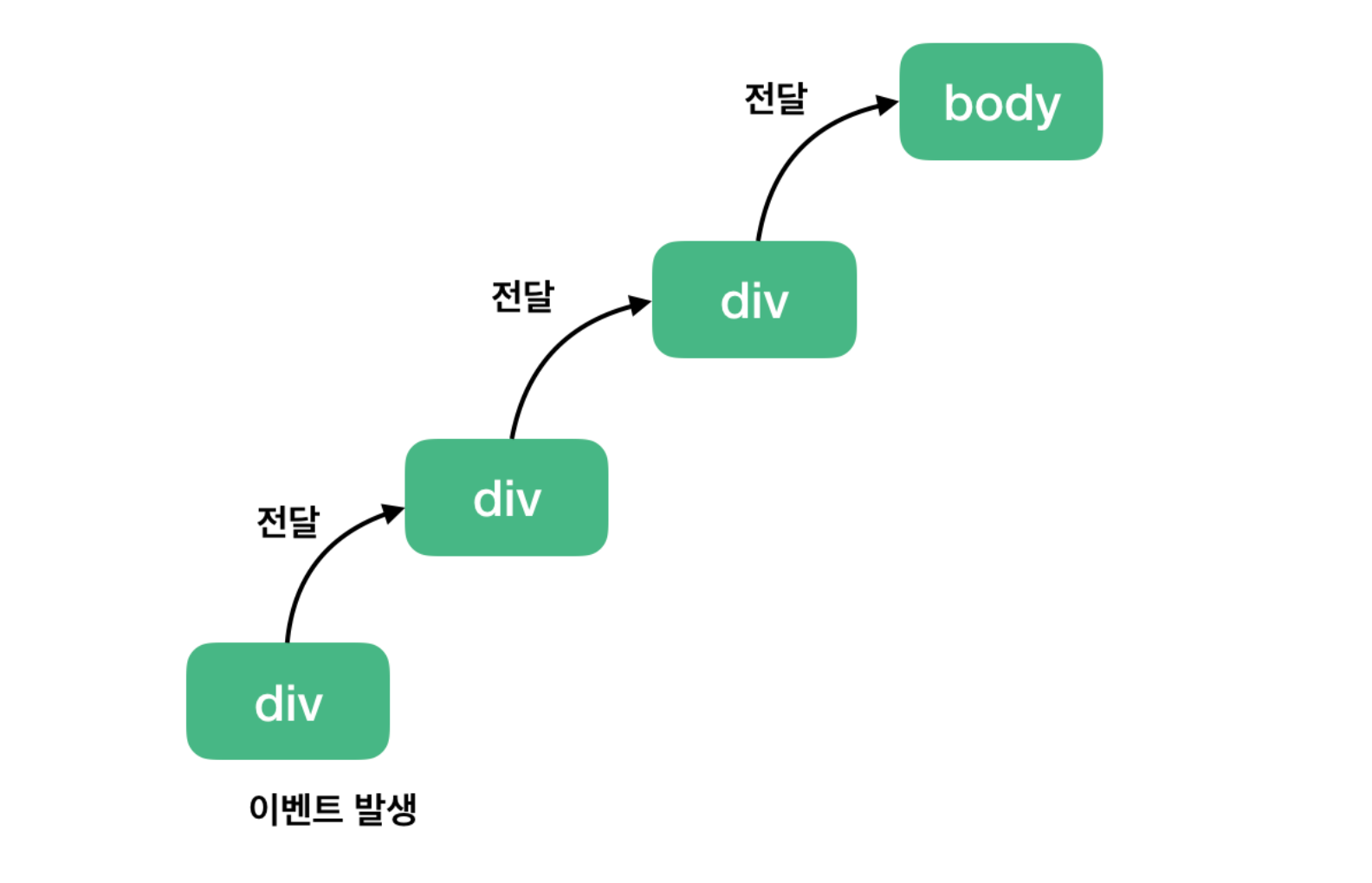
이벤트 버블링이란 부모 태그에 걸어 놓은 이벤트가 모든 자식에 전파되는 속성
div에 이벤트를 걸어놓으면 body의 ul,li에 동일 이벤트가 전파됨
1
2
3
4
5
6
7
8
9
10
11
12
13
14
15
16
17
18
19
20
21
22
23
24
25
26
27
28
29
30
31
32
33
34
35
36
37
38
39
40
41
42
43
44
45
46
47
48
49
50
51
52
53
54
55
56
57
58
59
60
61
62
63
64
65
66
67
68
69
70
71
72
73
74
75
<!DOCTYPE html>
<html lang="en">
<head>
    <meta charset="UTF-8">
    <meta http-equiv="X-UA-Compatible" content="IE=edge">
    <meta name="viewport" content="width=device-width, initial-scale=1.0">
    <title>Document</title>
    <style>
        table {border-collapse: collapse; border-radius: 4px;}
        thead th, tbody td{
            border: 1px solid black;
        }
    </style>
</head>
<body>
    <table>
        <thead>
            <th>번호</th>
            <th>이름</th>
            <th>내용</th>
            <th>삭제</th>
        </thead>
        <tbody class="list">
            <tr>
                <td>1</td>
                <td>츄</td>
                <td>안녕</td>
                <td><button type="button">삭제</button></td>
            </tr>
            <tr>
                <td>2</td>
                <td>치치</td>
                <td>안녕</td>
                <td><button type="button">삭제</button></td>
            </tr>
            <tr>
                <td>3</td>
                <td>룰루</td>
                <td>안녕</td>
                <td><button type="button">삭제</button></td>
            </tr>
            <tr>
                <td>4</td>
                <td>말리</td>
                <td>안녕</td>
                <td><button type="button">삭제</button></td>
            </tr>
            <tr>
                <td>5</td>
                <td>츄</td>
                <td>안녕</td>
                <td><button type="button">삭제</button></td>
            </tr>
        </tbody>
    </table>

    <script>

        var list = document.querySelector(".list");             //부모태그 지정


        list.onclick = function(){                              //부모태그에 이벤트
            //console.log(event.target)
            if(event.target.tagName != "BUTTON"){               //이벤트 tag가 BUTTON이 아닌것은 제외
                return;
            }else{
            event.target.parentElement.parentElement.remove();
            }
        }

    </script>

</body>
</html>
event버블링과 className,classList
1
2
3
4
5
6
7
8
9
10
11
12
13
14
15
16
17
18
19
20
21
22
23
24
25
26
27
28
29
30
31
32
33
34
35
36
37
38
39
40
41
42
43
44
45
46
47
48
49
50
51
52
53
54
55
56
57
58
59
60
61
62
63
64
65
66
67
68
69
70
71
72
73
74
75
76
77
78
79
80
81
82
83
84
85
86
87
88
89
90
91
92
93
94
95
96
97
98
99
100
<!DOCTYPE html>
<html lang="en">
<head>
    <meta charset="UTF-8">
    <meta http-equiv="X-UA-Compatible" content="IE=edge">
    <meta name="viewport" content="width=device-width, initial-scale=1.0">
    <title>Document</title>
</head>
    <style>
        table {border-collapse: collapse; width:50%; text-align: center;}
        thead th, tbody td{
            border: 1px solid black;
        }
    </style>
<body>
    <table id="mainTable" class="mainTable">
        <thead>
            <tr>번호</tr>
            <tr>과정명</tr>
            <tr>담당교수</tr>
            <tr>관리</tr>
        </thead>
        <tbody class="tableList">
            <tr>
                <td>1</td>
                <td>강남</td>
                <td>츄</td>
                <td>
                    <button type="button" class="btn-primary testInfo">시험기본정보</button>
                    <button type="button" class="btn-danger testInput">시험출제</button>
                    <button type="button" class="btn-defualt testResult">시험결과</button>
                    <button type="button" class="btn-info scroeInfo">성적관리</button>
                </td>
            </tr>
            <tr>
                <td>2</td>
                <td>종로</td>
                <td>츄2</td>
                <td>
                    <button type="button" class="btn-primary testInfo">시험기본정보</button>
                    <button type="button" class="btn-danger testInput">시험출제</button>
                    <button type="button" class="btn-defualt testResult">시험결과</button>
                    <button type="button" class="btn-info scroeInfo">성적관리</button>
                </td>
            </tr>
            <tr>
                <td>3</td>
                <td>용인</td>
                <td>츄3</td>
                <td>
                    <button type="button" class="btn-primary testInfo">시험기본정보</button>
                    <button type="button" class="btn-danger testInput">시험출제</button>
                    <button type="button" class="btn-defualt testResult">시험결과</button>
                    <button type="button" class="btn-info scroeInfo">성적관리</button>
                </td>
            </tr>
            <tr>
                <td>4</td>
                <td>분당</td>
                <td>츄4</td>
                <td>
                    <button type="button" class="btn-primary testInfo">시험기본정보</button>
                    <button type="button" class="btn-danger testInput">시험출제</button>
                    <button type="button" class="btn-defualt testResult">시험결과</button>
                    <button type="button" class="btn-info scroeInfo">성적관리</button>
                </td>
            </tr>
        </tbody>
    </table>

    <script>
        var mainTable = document.getElementById("mainTable");
        var tableList = mainTable.querySelector(".tableList");


        tableList.onclick = function(){

            //console.log(event.target.classList)
            var classList = event.target.classList;


            if(event.target.tagName != "BUTTON"){               //이벤트 tag가 BUTTON이 아닌것은 제외
                return;
            }else{
                if(classList.contains("testInfo")){                  //testInfo 값이 class 리스트안에 있다면 true를 반환
                    console.log("시험기본정보에대한 내용...")
                }else if(classList.contains("testInput")){
                    console.log("시험출제..")
                }else if(classList.contains("testResult")){
                    console.log("시험결과..")
                }else if(classList.contains("scroeInfo")){
                    console.log("성적관리")
                }
            }

        }
    </script>
</body>
</html>