
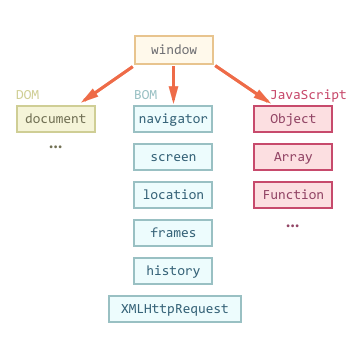
window객체 팝업창
javascript window 객체는 최상위 객체로 자주 사용되는 기능 open(),close(),confirm(),alert(),setTimeout() 등이 있다.
팝업창 열기 - window.open(문서주소,이름,”옵션=값”) 팝업창 닫기 - window.close()
1
2
3
4
5
6
7
8
9
10
11
12
13
14
15
16
17
18
19
20
21
22
23
24
25
<!DOCTYPE html>
<html lang="en">
<head>
    <meta charset="UTF-8">
    <meta http-equiv="X-UA-Compatible" content="IE=edge">
    <meta name="viewport" content="width=device-width, initial-scale=1.0">
    <title>Document</title>
</head>
<body>


    <script>
        window.onload = function(){

            //open(문서주소, 타이틀이름, 옵션)
            //window.open("https://naver.com","네이버창","width=300, height=300, left=100, top=100");
            window.open("popup.html","팝업창","width=300, height=300")

        }

    </script>


</body>
</html>
popup.html
1
2
3
4
5
6
7
8
9
10
11
12
13
14
15
<!DOCTYPE html>
<html lang="en">
<head>
    <meta charset="UTF-8">
    <meta http-equiv="X-UA-Compatible" content="IE=edge">
    <meta name="viewport" content="width=device-width, initial-scale=1.0">
    <title>Document</title>
</head>
<body>

    <button onclick="window.close()">닫기</button>


</body>
</html>